Director's viewfinder for iPhone, iPad and Apple Watch
See the shot before the camera is on the truck.
Pick the camera, the recording mode and the lens. Your phone shows you that frame, so you can scout and block the shot days before the gear shows up. Made for directors, DPs, camera operators, videographers and photographers.

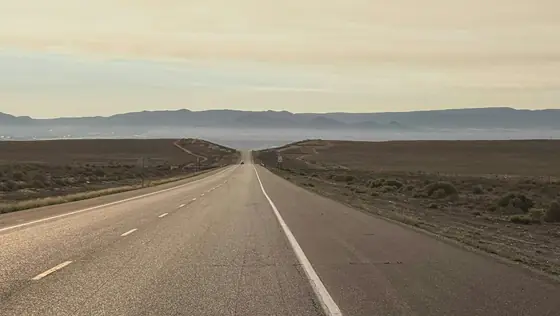


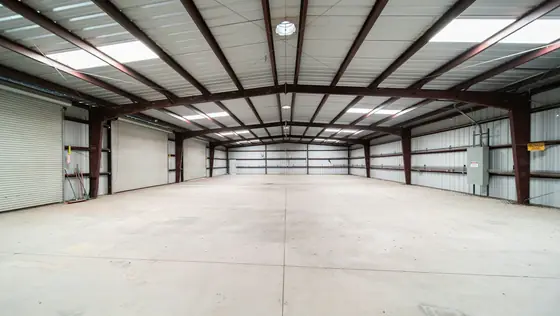


Same spot. Two lenses.
Stand where the camera will stand and flip between lenses. You see how much of the room a 24 gives you and how tight the 85 really is, on the camera you are actually renting.

In the app it is your phone's live picture, matched to whichever of its back cameras fits. How the math works
The whole kit at once
Overview draws every lens in your kit as frame lines over one picture. Settle the lens order for the day before anyone opens a case.
Build a lens kitVertical, by choice
Shooting 9:16 for social? Choose Vertical in Settings, then say how the camera will do it: Extract crops 9:16 out of the wide frame, Rotated turns the camera on its side. Each has its own field of view.
Frame for verticalWhat stays sharp
Near, far and hyperfocal for the stop you plan to shoot at, worked out for that camera's gate. Drop in a stand-in figure to see how big your actor sits in frame.
How depth of field is worked outKnow where the sun goes
See the sun's path over the live picture for any day of the year, with golden hour and blue hour on the clock. Pick your side of the street before the call sheet goes out.
If the sun path looks off
Shots the crew can read
Take stills and short takes with the frame lines and the lens burned in. File them by scene, then send a PDF shot list the whole crew can open.
Send a PDF shot list
On your wrist and on the monitor
The Apple Watch is a remote for the iPhone app. See the frame, step through the kit with the Digital Crown and fire the shutter from beside the camera position.
Plug in a monitor or pick an AirPlay screen, and the director watches a clean frame, with a lower third naming the camera and lens, while you keep the controls.
Use the Apple Watch remote Show a clean feed on a monitor
Counted November 2, 2026
From 37 camera makers and more than 100 lens brands: cine, photo, broadcast and film. Each recording mode shows where its size came from. Missing your camera? Ask from inside the app.
Search cameras and lenses
Free tools for camera people
No sign-up, nothing to install. See every free tool
Price
Download it free, then pay once inside the app with Unlock Forever. That opens all of Viewfinder on your iPhone and iPad, Apple Watch remote included, and nothing is sold on top of it later.
Download on the App StoreSign in with the email you use for Cutvey, on a Solo, Pro, Studio or Enterprise seat, and Viewfinder opens on up to three of your devices. It keeps working offline for up to seven days at a time.
What is Cutvey?Questions
How close is the frame to what the real camera sees?
As close as its sources. The frame comes from the recording mode's size, the lens's marked focal length and your phone's own field of view, which iOS reports for each camera. More than half of the modes are worked out from the sensor's pixel size rather than read off a published figure, and each mode says which. You can measure and correct your phone's cameras in Settings, Calibration.
Can I frame for vertical?
Yes. Choose Vertical under Orientation in Settings, then pick whether you are cropping 9:16 out of the wide frame or turning the camera on its side. Each gives its own field of view. Turning the phone does not switch it.
Does it work with my Apple Watch?
The Watch is a remote for the iPhone app: see the frame, step through your lenses with the Digital Crown and press the shutter. Keep the iPhone app open on the viewfinder. It needs watchOS 10 or later.

Does it need a signal?
Not on set: framing, the gear list, the sun and depth of field work with no signal, because the gear list ships inside the app and the sun is computed on the device. Buying, restoring and signing in need one, and a Cutvey membership checks in within seven days. Your shots stay on your devices unless you share them.
Is there a Mac or Android version?
No. Viewfinder runs on iPhone and iPad with iOS 17 or later, with the Apple Watch as a remote.